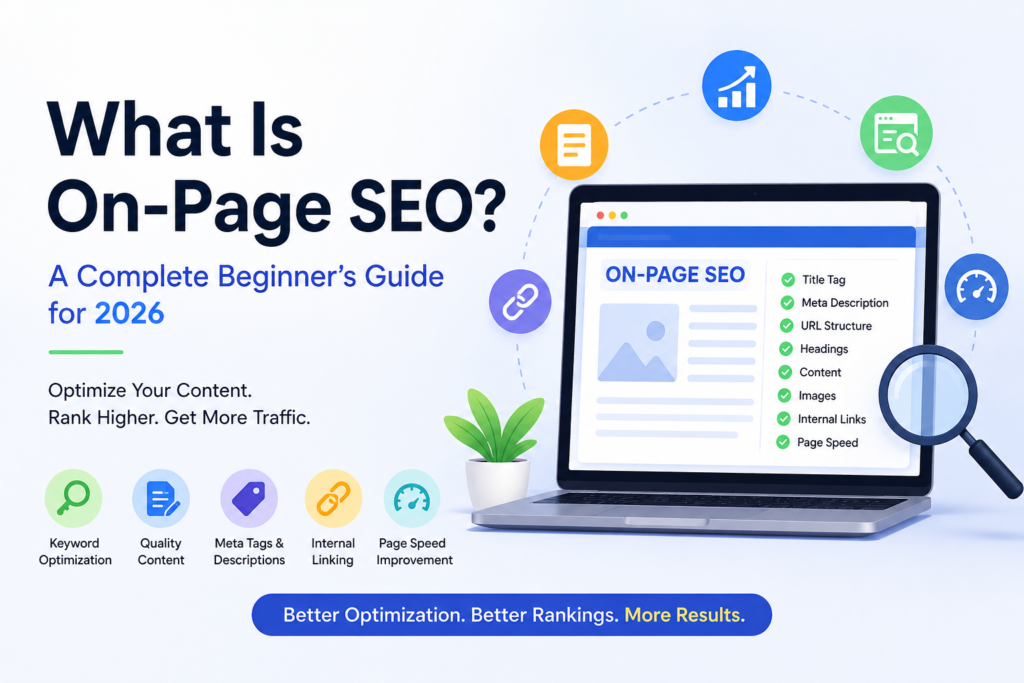
What Is On-Page SEO? A Complete Beginner’s Guide for 2026

Introduction
If you want your website to rank higher on Google and appear in AI-powered search tools like ChatGPT, Gemini, and Perplexity, learning on-page SEO is essential.
On-page SEO focuses on optimizing the content and structure of your webpages so search engines can better understand them. When done correctly, it can improve your rankings, increase organic traffic, and help your content reach the right audience.
In this guide, you’ll learn what on-page SEO is, why it matters, and the most effective techniques to optimize your website in 2026.
What Is On-Page SEO?
On-page SEO is the process of optimizing individual webpages to improve their visibility in search engine results.
It involves enhancing elements such as:
- Content
- Headings
- Keywords
- Images
- URLs
- Meta descriptions
- Internal links
- Page speed
The goal is to help search engines understand your content while providing a better experience for visitors.
Why Is On-Page SEO Important?
On-page SEO helps search engines determine what your page is about and whether it matches a user’s search query.
A well-optimized page can:
- Rank higher in search results
- Attract more organic traffic
- Improve user experience
- Increase click-through rates
- Generate more leads and sales
- Improve visibility in AI search results
Without proper optimization, even high-quality content may struggle to rank.
On-Page SEO vs. Off-Page SEO
Many beginners confuse on-page SEO with off-page SEO.
| Feature | On-Page SEO | Off-Page SEO |
|---|---|---|
| Definition | Optimization activities performed directly on your website to improve search rankings. | SEO activities performed outside your website to increase authority and visibility. |
| Control | Fully controlled by the website owner. | Depends on external websites, users, and platforms. |
| Main Goal | Improve content quality, relevance, and user experience. | Build website authority, trust, and popularity. |
| Impact on SEO | Helps search engines understand and rank your content. | Increases domain authority and credibility. |
| Examples | Optimizing headings, content, images, and page speed. | Earning backlinks, social shares, and online mentions. |
Both are important, but on-page SEO is often the best place to start because you have complete control over it.
11 Essential On-Page SEO Techniques
1. Place Keywords Strategically
Keywords help search engines understand your content.
Include your target keyword naturally in:
- Page title
- H1 heading
- First paragraph
- Subheadings
- URL slug
- Image alt text
Avoid keyword stuffing. Focus on writing naturally while maintaining relevance.
2. Create Accurate Title Tags
A title tag is one of the most important SEO elements.
Best practices:
- Keep it between 50–60 characters
- Include your target keyword
- Make it compelling
- Ensure it accurately describes the page
Example:
What Is On-Page SEO? Complete Guide for Beginners
A strong title encourages users to click your page.
3. Optimize URL Slugs
A URL should be short, descriptive, and easy to read.
Good Example:
yourwebsite.com/on-page-seo-guide
Bad Example:
yourwebsite.com/post?id=12345&page=seo2026
Tips:
- Include the primary keyword
- Use hyphens between words
- Avoid unnecessary numbers or symbols
4. Write Effective Meta Descriptions
A meta description summarizes your page for searchers.
Although it isn’t a direct ranking factor, it can increase click-through rates.
Example:
“Learn what on-page SEO is and discover 11 proven techniques to improve rankings, traffic, and visibility in 2026.”
Best practices:
- Keep it around 105–155 characters
- Include the main keyword
- Use action-oriented language
5. Use Proper Heading Structure
Headings make content easier to read and understand.
A typical structure looks like:
- H1: Main Title
- H2: Main Sections
- H3: Subsections
- H4: Additional Details
Proper headings improve user experience and help search engines understand your content hierarchy.
6. Create High-Quality Content
Content remains the foundation of SEO success.
Your content should:
- Answer user questions clearly
- Match search intent
- Provide unique insights
- Be easy to read
- Include relevant examples
Instead of writing for search engines, focus on helping readers solve problems.
7. Add Internal Links
Internal links connect pages within your website.
Benefits include:
- Better navigation
- Improved crawlability
- Increased page authority distribution
- Longer user sessions
For example, if you publish an article about keyword research, link to related posts about SEO tools and content optimization.
8. Link to Trusted External Sources
External links can improve credibility by supporting your claims with trustworthy information.
When adding external links:
- Use authoritative sources
- Ensure relevance
- Avoid excessive linking
- Use descriptive anchor text
Quality references help build trust with both users and search engines.
9. Optimize Images
Images enhance user experience but should also be optimized for SEO.
Best practices:
- Use descriptive file names
- Add meaningful alt text
- Compress images
- Use modern formats like WebP
- Include keywords when relevant
Example
File Name:
on-page-seo-checklist.webp
Alt Text:
On-page SEO checklist showing key optimization factors.
10. Improve Page Speed
Page speed affects rankings and user experience.
Slow-loading pages often experience higher bounce rates.
Ways to improve speed:
- Compress images
- Minify CSS and JavaScript
- Reduce redirects
- Use browser caching
- Choose fast hosting
Regularly test your site using performance analysis tools.
11. Implement Schema Markup
Schema markup helps search engines understand your content more effectively.
Popular schema types include:
- Article Schema
- FAQ Schema
- Product Schema
- Review Schema
- Local Business Schema
Schema can help your pages earn rich results that attract more clicks from search users.
How to Measure On-Page SEO Success
After implementing on-page SEO improvements, track key performance metrics such as:
(a) Organic Traffic
Monitor how many visitors arrive through search engines.
(b) Keyword Rankings
Track positions for your target keywords.
(c) Click-Through Rate (CTR)
Measure how often users click your listing.
(d) User Engagement
Review metrics like:
- Time on page
- Bounce rate
- Pages per session
(e) Search Visibility
Monitor appearances in featured snippets, AI search results, and other SERP features.
Common On-Page SEO Mistakes to Avoid
Many websites fail to rank because of simple mistakes.
Avoid:
- Keyword stuffing
- Duplicate content
- Missing title tags
- Poor heading structure
- Slow page speed
- Broken internal links
- Missing image alt text
- Thin content
Fixing these issues can significantly improve SEO performance.
Conclusion
On-page SEO remains one of the most powerful ways to improve your website’s visibility in both traditional and AI-powered search engines. By optimizing your content, titles, URLs, images, internal links, and page speed, you make it easier for search engines to understand your pages and serve them to the right audience.
Start by implementing these 11 on-page SEO techniques one step at a time. Consistent optimization and regular content updates can lead to higher rankings, increased organic traffic, and long-term online growth in 2026 and beyond.
FAQs
1. What is on-page SEO?
On-page SEO is the process of optimizing elements on your website, such as content, keywords, headings, images, and meta tags, to improve search engine rankings and user experience.
2. Why is on-page SEO important?
On-page SEO helps search engines understand your content better, improves visibility in search results, increases organic traffic, and enhances the overall user experience.
3. What are the most important on-page SEO factors?
Some of the most important on-page SEO factors include keyword optimization, high-quality content, title tags, meta descriptions, internal links, image optimization, and page speed.
ALSO READ:
Aman Khati
Digital marketing expert at Gundrux. Specialising in SEO, WordPress, Social Media Automation and Faceless AI YouTube.